> ## Documentation Index
> Fetch the complete documentation index at: https://docs.snagsolutions.io/llms.txt
> Use this file to discover all available pages before exploring further.
# Join Telegram Group
> Telegram join loyalty rule. Reward users for joining your Telegram group or channel.
## Overview
This loyalty rule allows admins to reward users for joining their [Telegram](https://telegram.org/) Group. This rule is useful for building a community in Telegram.
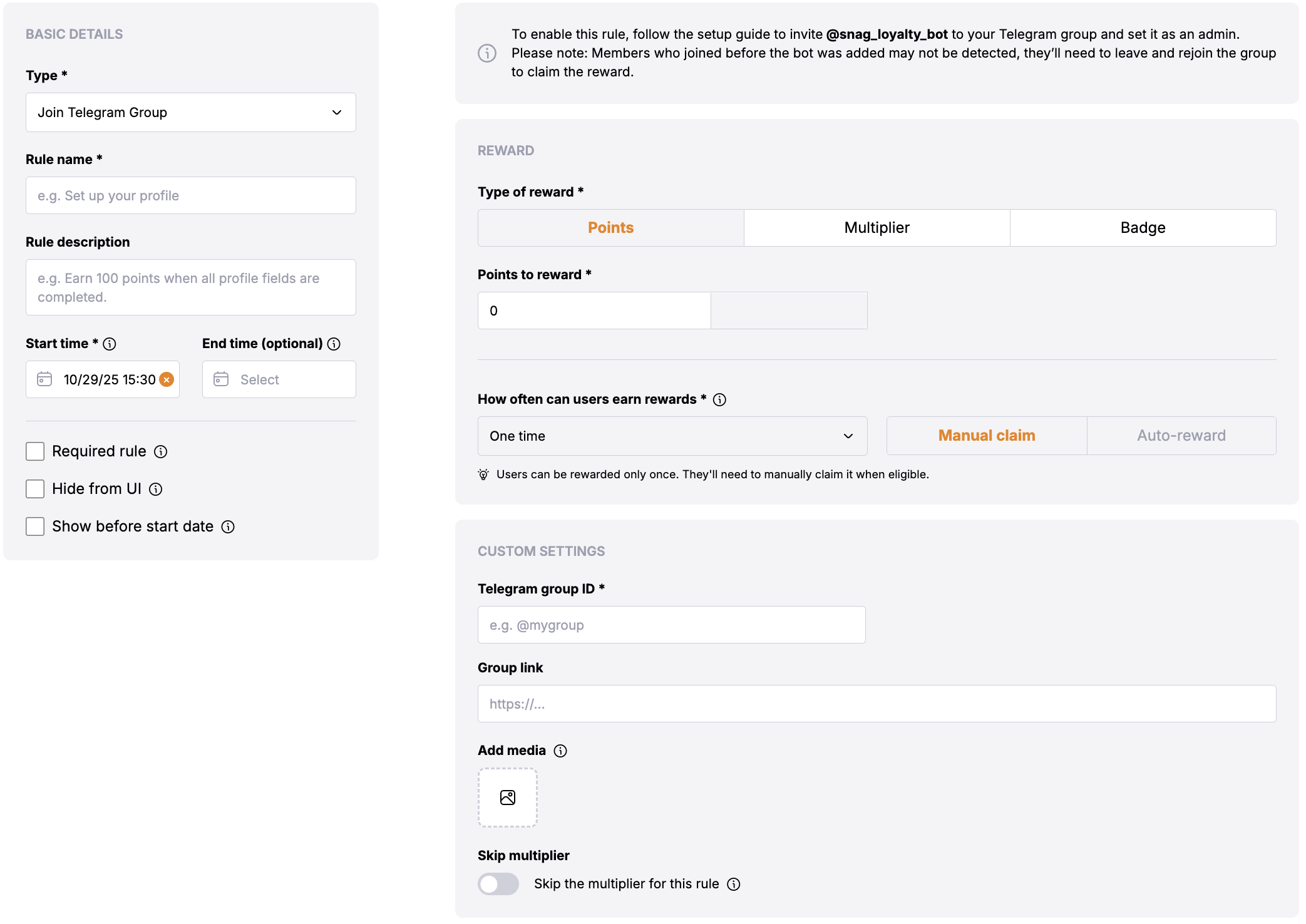
## Prerequisites
* Snag [Telegram loyalty bot](https://t.me/snag_loyalty_bot) must be added to the Telegram group with admin permissions:
* [Bot Link](https://t.me/snag_loyalty_bot)
* The user must have connected their Telegram account to Snag.
* The user must have joined the defined Telegram group.
## Rule Configuration Fields
### **Reward**
* **Type of Reward**: Choose between "Points" or "Multiplier".
* **Points**: Users will get the defined no of points.
* **Multiplier**: Users will get the multiplier of the defined amount.
### Basic Settings
* **Update Cadence**: This defines that the rule will run daily/weekly/monthly at the defined start time and check if new users has joined the defined Telegram group. This rule can also be claimed from the UI by clicking on the **"Claim" button** by the users.
* **User Reward Frequency**: This is one time reward and user will be rewarded once they join the defined Telegram group.
### **Custom Settings**
* Skip the multiplier for this rule
* **Group link**: This will add the button on rule display page to take the user to the Telegram group.
* **Telegram group ID**: The identifier for the Telegram group where the rule will be applied.
For public group and group, you can use either:
* **Username**: Enter the group username (e.g., `@groupname` or `groupname`)
* **Invite link**: Use the full invite link (e.g., `https://t.me/groupname`)
For private group, you need the group ID:
Go to [https://web.telegram.org](https://web.telegram.org) and navigate to your private group or group.
Copy the URL from your browser's address bar. It will look like: [https://web.telegram.org/k/#-3243034605](https://web.telegram.org/k/#-3243034605)
You can use either:
* The full URL: `https://web.telegram.org/k/#-3243034605`
* Just the ID number: `-3243034605`
The ID will always be a negative number for private group. Make sure to include the minus sign when copying just the ID number.
## Troubleshooting
### User Verification Issues
When users report verification issues with Telegram join rules, follow this troubleshooting process:
If the user was already a member of the Telegram group before the Snag loyalty bot was added as an admin, they may experience verification issues. In such cases, instruct the user to:
**Leave and rejoin the group**
This simple action will refresh their membership status and allow the system to properly verify their participation. This is a common solution for users who joined before the loyalty rule was configured.