> ## Documentation Index
> Fetch the complete documentation index at: https://docs.snagsolutions.io/llms.txt
> Use this file to discover all available pages before exploring further.
# Snag Reporting (Looker) Overview
> Access Snag's Looker-powered dashboards for loyalty analytics. View transactions, accounts, referrals, minting data, and user engagement insights.
Snag uses Google's data visualization tool, Looker, to manage reporting for all program data. Using Looker lets us ship faster by removing the need to build every reporting feature as a separate dev task.
Historically, dashboards were shared via custom links per project. Moving forward (as of November ’25), all partners will use a single shared dashboard link, with data automatically isolated by partner instance and permissioned based on your email:
[https://lookerstudio.google.com/u/0/reporting/d2b6a810-d985-4226-9c02-bc3666a1f263/page/tEnnC](https://lookerstudio.google.com/u/0/reporting/d2b6a810-d985-4226-9c02-bc3666a1f263/page/tEnnC)
## How to Use Looker / Best Practices
These are the two most frequent issues users run into:
1. **Filters are case-sensitive and require lowercase entries** - This is especially important for wallet addresses. Before entering an address into a filter, convert it to lowercase. You can use: [https://convertcase.net/](https://convertcase.net/) to quickly convert upper + lower case addresses to lowercase.
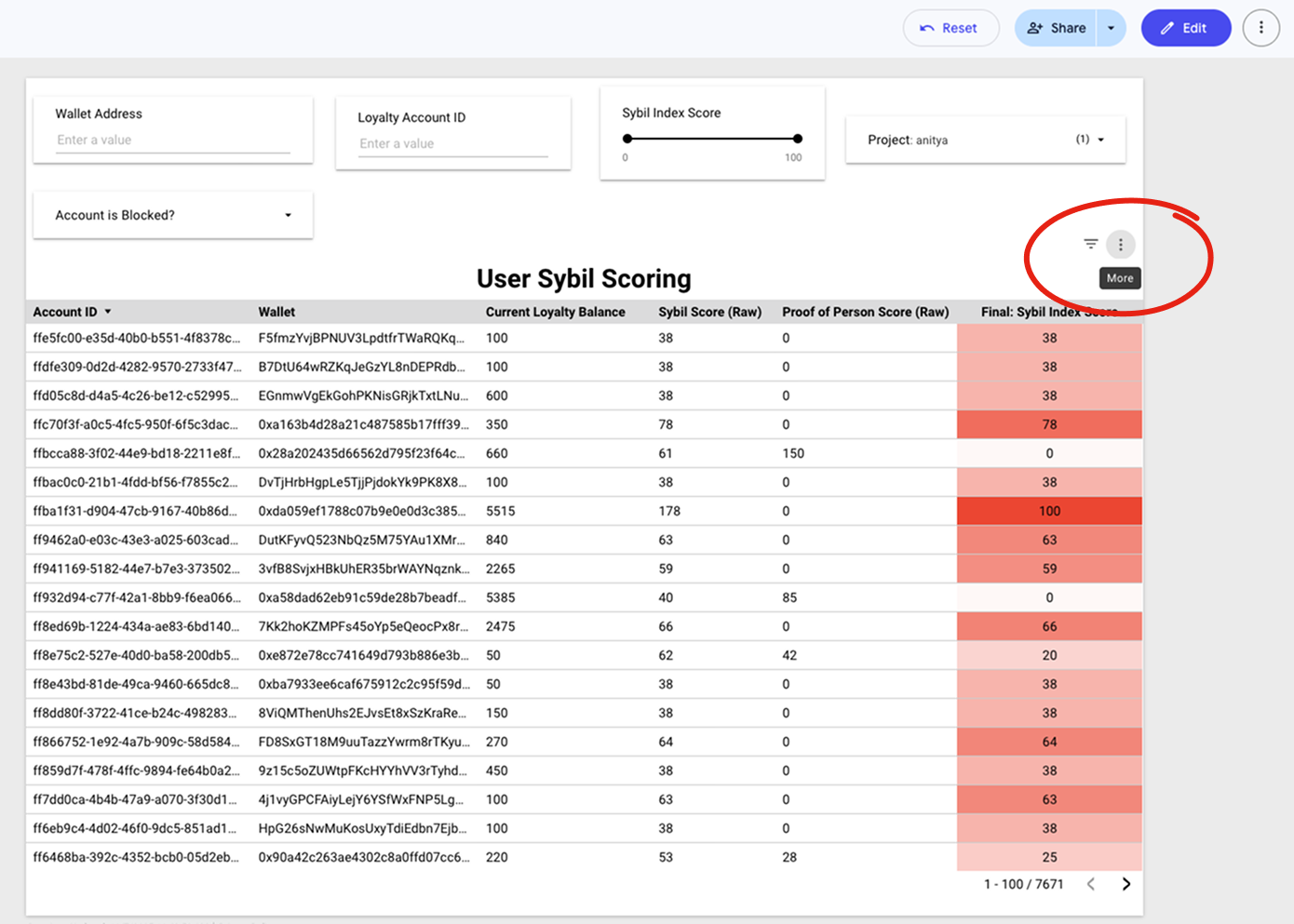
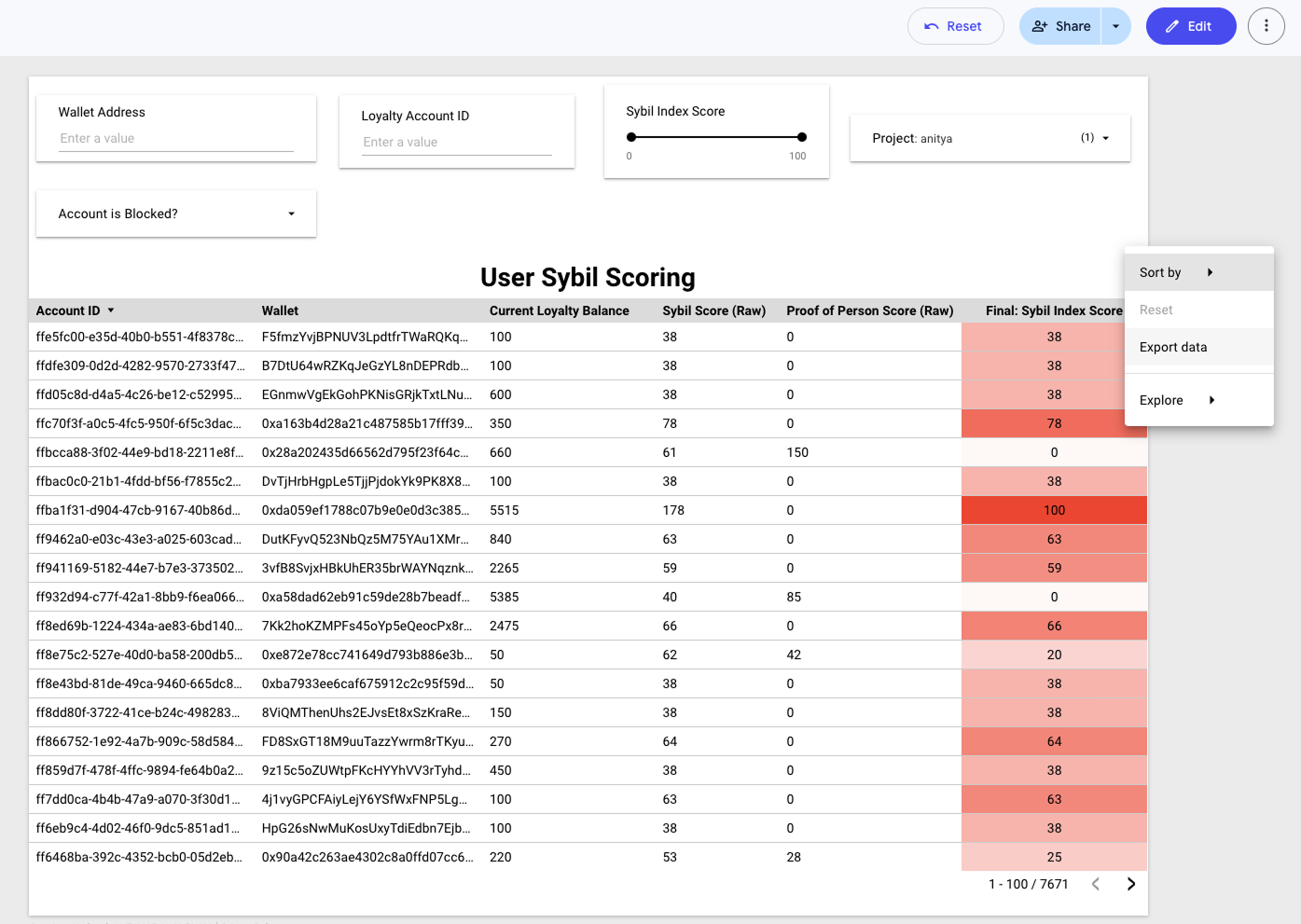
2. **Downloading data uses the hidden “three dots”** - Downloads are accessed from the **hover-only three dots** inside each table or chart, *not* the three dots at the top of the view next to “Edit.”
Hover → click the three dots → choose your export format.
**Note:** Downloads are capped at **750k rows**. For exports larger than 750k rows, either:
* Split the download using filters, or
* Use our APIs.
 ## Available data
Below is a summary of the available views in Looker and their core use cases.
Used to look at raw loyalty transaction data for every quest completed. This includes multipliers applied to the transaction, but multipliers themselves aren’t included as ‘rows’ only points earned.
You can also find poll and text entry response submissions for polls and text entry response quests here.
This is your CRM with an overview of associated wallet addresses, social profiles, and email addresses.
Look at top referrers, with summary statistics for number of a users referrals completing account set up and the ability to filter by referrer.
Deep dive into all of the referred addresses from any specific referring user.
Overview of quests completed by quest type and distribution of points distributed + quests completed by wallet address.
Overview of points distributed, outstanding, and spent over time.
All contracts created and assets minted via our minting + rewards shop platform with summaries of both contracts created and specific assets minted.
A summary of all information collected from both our burn to redeem and collect user information flows in our minting + rewards shop.
A summary of all auctions data and auction winners from our minting + rewards shop.
An overview of all badges rewarded to users.
A detailed export of every sweepstakes entry and status (Winner / not winner).
An overview of number of entries + unique users for each sweepstakes.
A deep dive into all quests created on the platform and the % of users engaging with each.
An overview of user first + last transaction dates, IP addresses, and any location data based on IP.
Post text and metadata for tracked X + TikTok posts rewarded via Snag social quests (New Post + Impression quests).
## Related pages
Configure and display public leaderboards for your loyalty program.
Track your platform usage including API calls and active users.
## Available data
Below is a summary of the available views in Looker and their core use cases.
Used to look at raw loyalty transaction data for every quest completed. This includes multipliers applied to the transaction, but multipliers themselves aren’t included as ‘rows’ only points earned.
You can also find poll and text entry response submissions for polls and text entry response quests here.
This is your CRM with an overview of associated wallet addresses, social profiles, and email addresses.
Look at top referrers, with summary statistics for number of a users referrals completing account set up and the ability to filter by referrer.
Deep dive into all of the referred addresses from any specific referring user.
Overview of quests completed by quest type and distribution of points distributed + quests completed by wallet address.
Overview of points distributed, outstanding, and spent over time.
All contracts created and assets minted via our minting + rewards shop platform with summaries of both contracts created and specific assets minted.
A summary of all information collected from both our burn to redeem and collect user information flows in our minting + rewards shop.
A summary of all auctions data and auction winners from our minting + rewards shop.
An overview of all badges rewarded to users.
A detailed export of every sweepstakes entry and status (Winner / not winner).
An overview of number of entries + unique users for each sweepstakes.
A deep dive into all quests created on the platform and the % of users engaging with each.
An overview of user first + last transaction dates, IP addresses, and any location data based on IP.
Post text and metadata for tracked X + TikTok posts rewarded via Snag social quests (New Post + Impression quests).
## Related pages
Configure and display public leaderboards for your loyalty program.
Track your platform usage including API calls and active users.